Illustrated example: recovery is complete, prevention is not
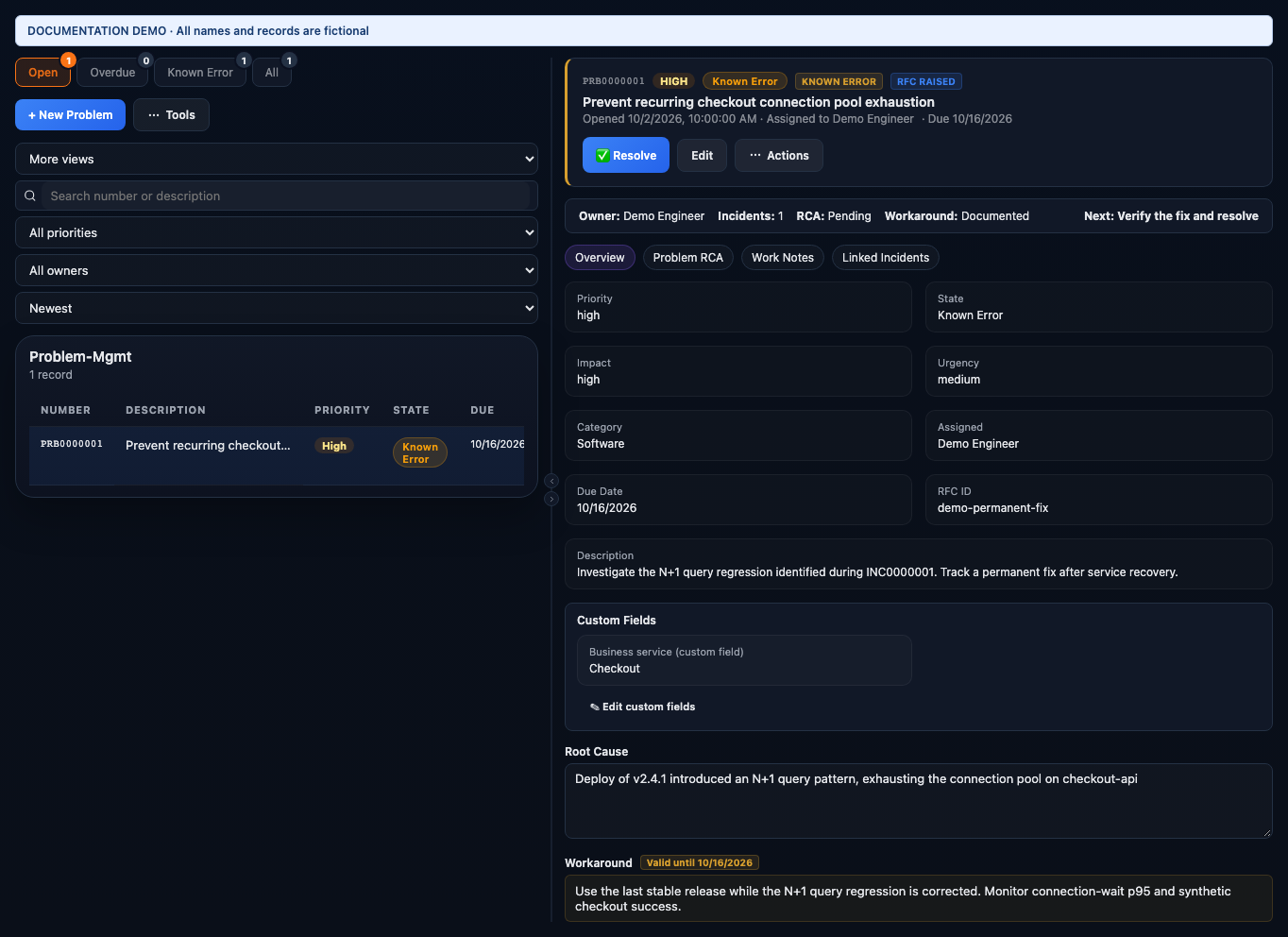
- Short description and Description define the recurring defect, not just one outage. Priority, Impact, Urgency, Category, and owner explain its operational importance.
- Root Cause records the supported explanation. For this example, the release introduced an N+1 query pattern and exhausted the connection pool.
- Workaround restores or preserves service until a permanent fix exists. Its validity date prompts re-evaluation rather than implying that the underlying defect is solved.
- Linked incidents show occurrences and their recovery history. The RFC link connects the planned permanent correction to change management. Fix verification records whether that correction has actually been checked.
Work the problem record
- Create a problem from the incident’s Raise Problem action or from Problem-Mgmt. Check for an existing problem before creating another record for the same defect.
- Link relevant incidents. Add work notes with timing, symptoms, and investigation evidence.
- Use Problem RCA when an AI investigation is appropriate; review its conclusion and document the supported root cause.
- Document a workaround and mark the known error when the applicable criteria are met. Review any proposed knowledge article and notifications.
- Raise or link the change that will implement the permanent correction. Track the implementation outcome and validate the fix.
- Resolve and close only after the required verification and closure checks pass. Keep incident resolution separate from problem completion.
A Problem represents the underlying cause behind one or more incidents — the difference between patching a symptom repeatedly and fixing it for good. Its lifecycle runs new, under investigation, known error, resolved, closed.
How problems get created
Problems can be opened manually, but most are detected automatically: three or more incidents against the same CI/category within 7 days, five or more firing alerts against the same CI/alertname within 60 minutes, a scheduled infrastructure review, or a post-change monitor triggered by a high/critical-risk change closing. A vulnerability-scan finding is another path in — either detected automatically or pushed in directly by a security team, with the CVE, severity, and affected CI attached.
Rather than starting from a blank form, Problems offers a set of built-in templates for common patterns — a recurring network outage, database performance degradation, an authentication/SSO failure, a security vulnerability, and others — that pre-fill category, priority, impact, and tags. Admins can also add custom templates, and problems can be bulk-imported from a spreadsheet-style file when migrating a backlog in.
Known Error Database
Marking a problem as a known error transitions it out of investigation and can auto-draft a knowledge-base article from the AI RCA output plus the workaround — landing in draft state until a human publishes it. Any known-error problem's root cause and workaround are then directly searchable through the KEDB.
Resolving
Moving a problem to resolved requires a documented root cause and a confirmed, verified fix — usually a linked Change that has closed successfully. Resolving cascades automatically: every incident still linked to the problem is closed along with it, with an auto-generated note explaining the permanent fix, and the people who reported those incidents are notified. That's the actual payoff of problem management — one resolution clears the whole backlog of related tickets instead of someone closing them one by one.
Closing
Closing a resolved problem is a separate step, and for a major problem it requires a completed major-problem review first — closing a major problem automatically opens a Post-Incident Review if one doesn't already exist, so that review requirement is never a dead end you have to chase down manually.
Opening a problem and linking incidents
From Problems, click + New Problem — optionally starting from one of the built-in templates — and fill in a title, description, and priority. In the Linked Incidents tab, search for the recurring incidents you suspect share a root cause (same CI or symptoms is usually the pattern) and link them — three to five is typical before running an analysis. If a new incident related to the same underlying issue shows up later, it can be spawned directly from the problem instead of created separately and linked after the fact.
Running a cross-incident RCA
In the Problem RCA tab, click Run AI Problem RCA. Unlike a single incident's RCA, this analyzes every linked incident together and looks for the common thread — for example, several unrelated-looking incidents that all trace back to the same misconfigured NTP server across sites.
Marking a known error
Once the root cause is established, click Mark as Known Error and enter a workaround — optionally linking a knowledge-base article. From that point on, the workaround is visible to any agent working a related incident, so the same fix doesn't get rediscovered from scratch each time.
Example
Three unrelated-looking incidents — a login failure in one data centre, a certificate warning in another, a scheduling error in a third — all recur within the same week. A manager opens a problem, links all three, and runs AI Problem RCA. The result: all three trace back to the same misconfigured NTP server drifting time across three data centres. The problem is marked a known error with the workaround "restart the NTP service on affected servers," and a change is raised for the permanent fix. Once that change closes successfully, the problem resolves automatically — closing all three linked incidents with a note pointing back to the fix, and notifying everyone who originally reported them.