Deployment Management → Git report checks Git-linked deployments against their tracked branch or tag. It shows what code has reached each environment and what is still waiting. A Compose file must be linked to a saved Git repository and deployed before its deployment can appear here. The current report checks Git-linked deployments within the latest 500 deployment records.
By deployment: find code that has not shipped
- Open Git report and click Check now to refresh repository checks.
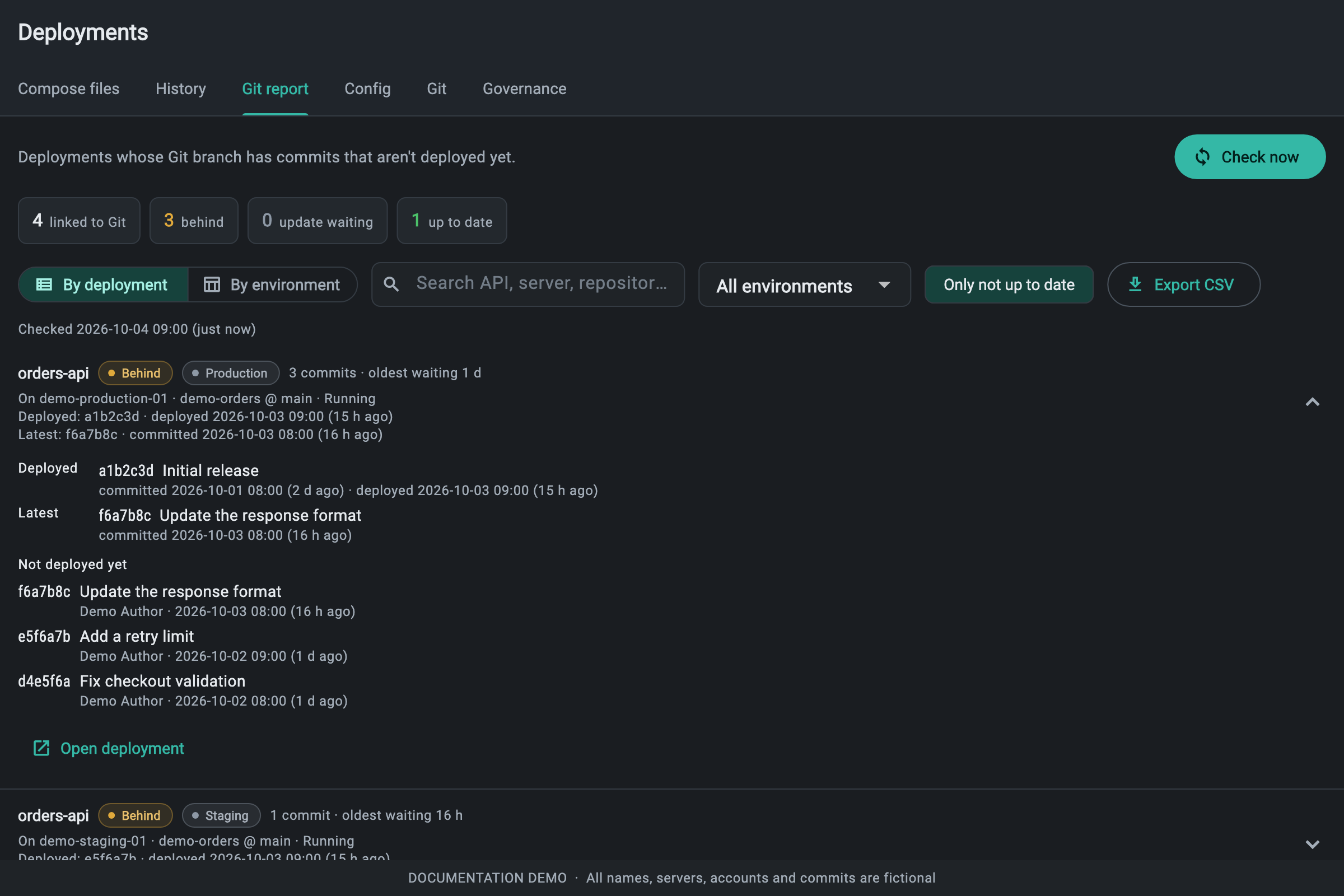
- Choose By deployment. Search by app name, server, repository or branch, and optionally choose an environment.
- Only not up to date is enabled initially. Turn it off when you want to see current deployments too.
- Expand a row to see the Deployed and Latest commits, commit messages and dates, undeployed commits and any pending requests.
- Use Open deployment to review the running revision and decide whether an administrator should redeploy or handle a waiting change.
Understand the statuses
- Up to date — the recorded deployed commit matches the current tracked Git ref. This is a code comparison; it does not certify container health.
- Behind — the deployed commit differs from the current Git ref and there is no pending update request.
- Update waiting — the deployment is behind and a change is already waiting for approval or a maintenance window. Inspect that request before submitting another.
- Not deployed — no rollout has recorded a Git commit yet.
- Can’t check — the repository or ref could not be checked. Read the error and check repository access, credentials, ref and connectivity.
Example: three commits are waiting
Assume orders-api tracks main. Production runs a1b2c3d, and the branch has three later commits: d4e5f6a (fix checkout validation), e5f6a7b (add a retry limit), and f6a7b8c (update the response format). Expanding its Behind row lists these undeployed commits with their dates. The latest commit date is when code was committed; Deployed at is when the current revision was rolled out.
The oldest waiting duration is the age of the oldest undeployed commit returned by the check. The report lists up to 20 missing commits per deployment; a count ending in + means more commits exist than it lists. If history cannot be read, or a force-push removed the deployed commit from the tracked history, the report cannot give a complete commit-by-commit gap.
By environment: see the release path
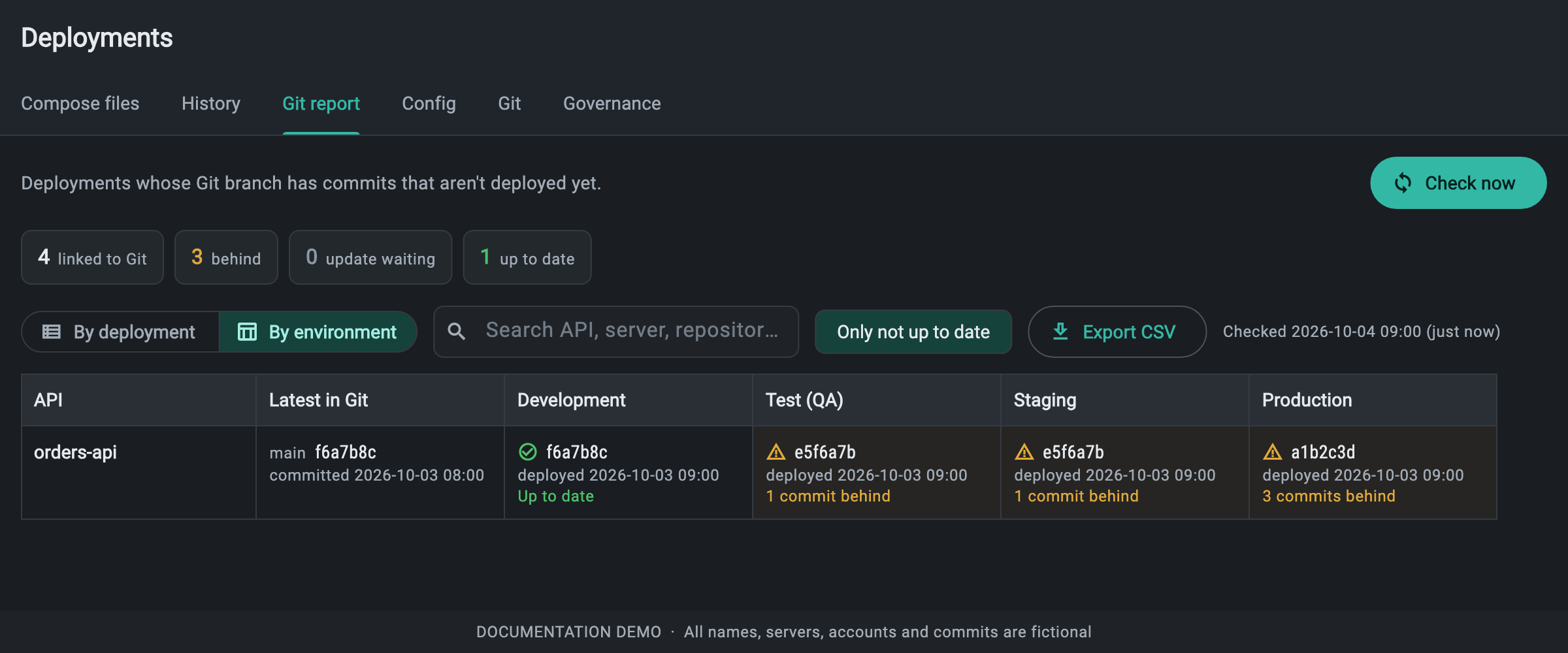
- Switch to By environment. Apps are grouped by their saved Compose file, with columns for Development, Test (QA), Staging and Production.
- Find orders-api. Each cell shows a deployed commit, deployment time and Git status; the latest Git ref is shown for the app.
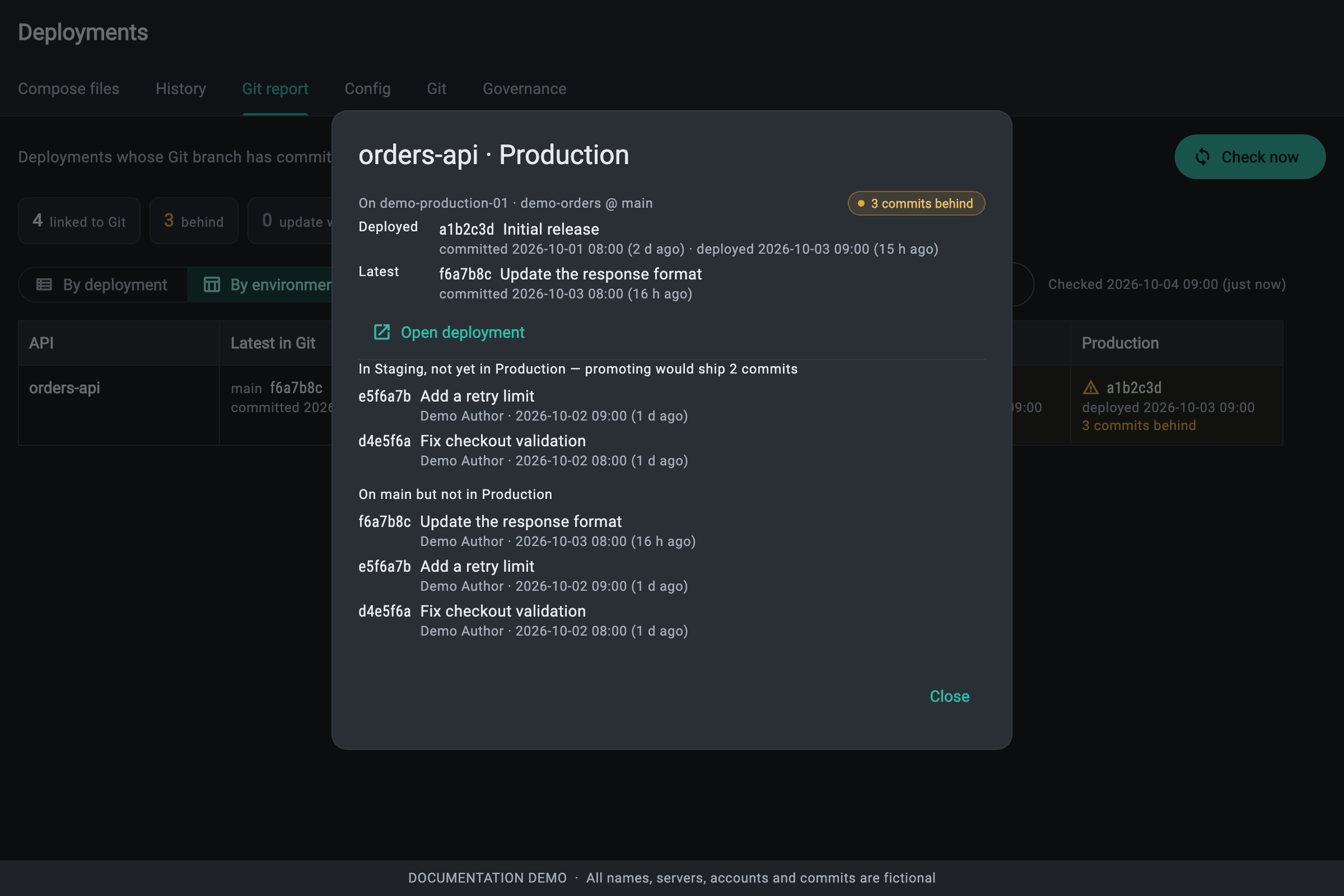
- Click the Production cell to see its server deployments, missing branch commits, and a comparison with the nearest earlier environment that has a deployment.
- If an environment has several deployments, open its cell to inspect every server. The summary selects the deployment needing attention; servers on different commits are flagged.
Example: what staging-to-production promotion would ship
Illustrative orders-api release state (all track main):

Latest in Git  f6a7b8c
Development    f6a7b8c  Up to date
Test (QA)      e5f6a7b  1 commit behind
Staging        e5f6a7b  1 commit behind
Production     a1b2c3d  3 commits behind
In this example, opening Production shows that promotion from Staging would ship d4e5f6a and e5f6a7b. It would not include f6a7b8c, because that commit has not reached staging. The branch gap is three commits; the staging-to-production gap is two. These answer different release questions.
An administrator can use Open deployment for the staging deployment, confirm its health and revision, then choose Promote and the production target. Promotion copies that revision’s Compose content, commit and replica counts, and follows the target environment’s approval rules. Reading the report does not start a deployment.
When comparisons are unavailable
- Different branches cannot be compared commit by commit in this view.
- Missing history, unavailable commit details or a truncated commit list can prevent a reliable promotion comparison.
- If staging is not deployed, the comparison uses the nearest earlier deployed environment to the left. Check the displayed source environment.
- The matrix groups by Compose file identity. Independently created files with similar names are separate apps.
- Only not up to date hides apps that are current everywhere while keeping their current environments visible when another environment needs attention.
Export the view you are using
Click Export CSV after choosing the view and filters. By deployment exports the filtered rows, including environment, server, repository, branch, status, commits, timestamps and errors. By environment exports one row per app with its latest Git ref and environment summaries. The environment dropdown applies to By deployment; the matrix keeps the environment columns together. Summary counts at the top refer to the whole checked report.